Terms
Minimal document signing: contracts written in markdown, commented on inline and signed with a typed e-signature
0.1MB · 3,730px tall · uses Times, diatype, Geist Mono
About the site
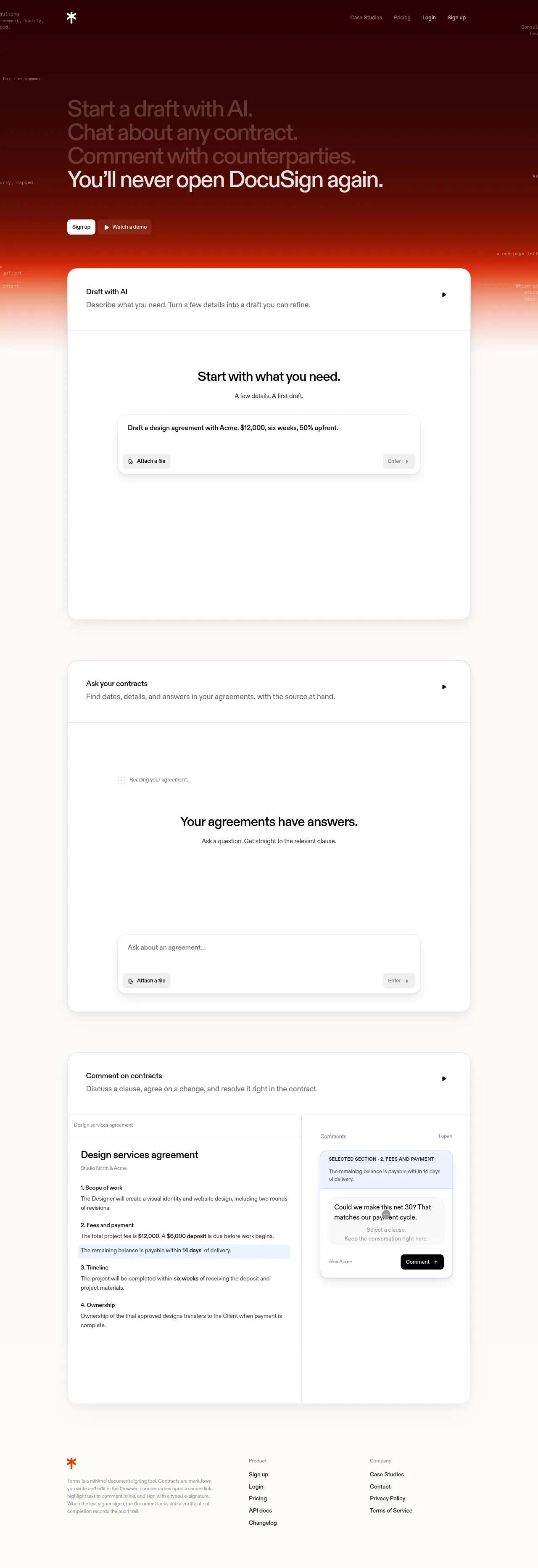
Terms is a minimal document signing tool. Contracts are markdown you draft with AI and edit in the browser; counterparties open a link, comment on a clause and sign with a typed e-signature, and the signed document locks with a certificate of completion. The homepage opens on a black-to-ember gradient where three grey lines ('Start a draft with AI. Chat about any contract. Comment with counterparties.') resolve into a white 'You'll never open DocuSign again.', with fragments of contract text set in monospace drifting at the edges. Below that the page is just three large product cards, each a working mock of one job: a prompt that drafts a $12,000 design agreement, an 'Ask your contracts' search, and a clause highlighted for comment with a 'Could we make this net 30?' reply. Naming the incumbent in the headline does the positioning work, so the rest of the page only has to prove the product is calmer than DocuSign.
How this page sells
For founders and freelancers sick of e-signature suites: name DocuSign as the enemy, then show three calm product cards that replace it.
Primary navigation
- Case Studies
- Pricing
- Login
- Sign up
ClickTap a section to see it on the page
Three dimmed lines, 'Start a draft with AI. Chat about any contract. Comment with counterparties.', resolve into a white 'You'll never open DocuSign again.' over a black-to-ember gradient with monospace contract fragments at the edges.
Why it converts: Naming the tool every buyer already resents turns a crowded category into a one-line promise, and the dimmed lines list the whole product before the punchline lands.
A product card titled 'Start with what you need. A few details. A first draft.' with a prompt already filled in: 'Draft a design agreement with Acme. $12,000, six weeks, 50% upfront.'
Why it converts: A concrete, realistic prompt with a fee, timeline and deposit shows the buyer exactly what they would type, so drafting a contract feels like a thirty-second job.
'Your agreements have answers.' with a 'Reading your agreement…' status and an 'Ask about an agreement…' box, under the line 'Find dates, details, and answers in your agreements, with the source at hand.'
Why it converts: Searching signed contracts is a pain DocuSign never solved, so this card extends the pitch from signing to everything that happens after it.
A design services agreement with the clause 'The remaining balance is payable within 14 days of delivery' highlighted and a comment thread asking 'Could we make this net 30? That matches our payment cycle.'
Why it converts: Negotiating inside the document, instead of over email attachments, is the moment a counterparty feels the difference, so the page shows it at full size.
The orange asterisk logo over a short description ending 'When the last signer signs, the document locks and a certificate of completion records the audit trail,' beside Changelog and API docs links.
Why it converts: Legal buyers need to know a typed signature holds up, so the audit-trail line answers the main objection quietly, where careful readers look.